


Managing Credentials in PilotFish

Separating secrets from Route configuration, with a sample Route for each approach
Overview
PilotFish integrations frequently require credentials or other sensitive configuration values to connect to external systems. Examples include database usernames and passwords, SFTP credentials, API usernames and passwords, API keys, authentication tokens, and client IDs/client secrets.
Credentials should generally be separated from individual Route configurations whenever possible. This makes credentials easier to maintain, allows values to differ between environments, and reduces the need to modify Routes when credentials change.
PilotFish provides several ways to accomplish this:
- PilotFish Environment Properties (environment-settings.conf)
- Operating-system environment variables
- A PilotFish utility Route that retrieves credentials dynamically
The appropriate approach depends on the customer’s infrastructure, security requirements, credential-management tools, and operational preferences.
For many implementations, using environment-settings.conf is the simplest way to get started.
1. PilotFish Environment Properties
PilotFish Environment Properties are external configuration values that can be referenced throughout an Interface.
They are stored in an external file named:
environment-settings.conf
Environment Properties are useful for settings that may change when an Interface moves from Development to Test, Staging, or Production.
Typical examples include:
Database.UserName
Database.Password
Database.URL

CustomerApi.UserName
CustomerApi.Password
CustomerApi.BaseUrl
For example:
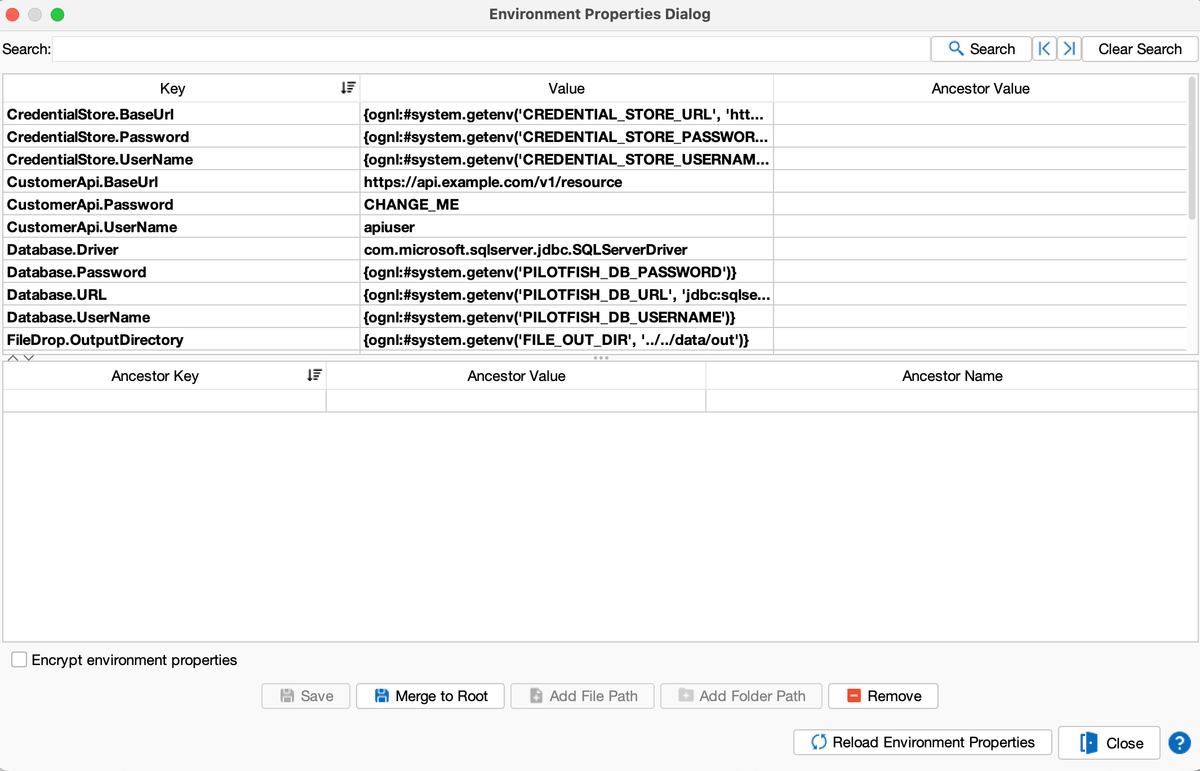
CustomerApi.UserName=apiuser
CustomerApi.Password=ExamplePassword
CustomerApi.BaseUrl=https://api.example.com
Editing Environment Properties in eiConsole
Environment Properties can be maintained through the eiConsole.
From the File Management screen:
Edit → Environment Properties
They can also be accessed from the Route Edit screen:
Route → Environment Properties
The Environment Properties dialog displays each property’s key and value.
Using the eiConsole to maintain these properties is generally preferable to editing the configuration file manually because the eiConsole handles the required formatting and escaping.
2. Referencing an Environment Property from a Route
Most configurable fields in PilotFish modules can use an Environment Property instead of a hard-coded value.
This applies to configuration fields in components such as Listeners, Processors, and Transports.
In the eiConsole, select the Enhanced Configuration Value button next to the configuration field.
The Environment Property selector allows a defined property to be selected.
PilotFish represents an Environment Property reference using:
$$property_name
For example, if an Environment Property is defined as:
CustomerApi.Password=ExamplePassword
a configurable field can reference:
$$CustomerApi.Password
The Route therefore references the property rather than containing the password itself.
Route
   |
   | $$CustomerApi.Password
   v
   Environment Property
   |
   v
Credential Value
When the Interface is promoted to another environment, the Route does not need to change. Only the Environment Property value changes.
Every sample Route except Route 7 uses $$ this way. Route 7 reads memory instead, because its secrets were fetched at runtime by Route 6. Compare Sample Routes 1 and 2: the HTTP fields are the same shape; only the property names (and therefore the property definitions) change.
3. Reading Operating-System Environment Variables
PilotFish can also obtain credential values from operating-system environment variables.
This provides another layer of separation because the actual credential does not need to be stored directly in the PilotFish Environment Properties file.
PilotFish supports this through an OGNL expression using:
#system.getenv(...)
A common implementation is to define a PilotFish Environment Property whose value is retrieved from an OS environment variable.
Example
Assume the operating system contains:
CUSTOMER_API_PASSWORD=MySecretPassword
The corresponding PilotFish Environment Property can retrieve the value using OGNL:
CustomerApi.Password={ognl:#system.getenv('CUSTOMER_API_PASSWORD')}When PilotFish evaluates the property, it retrieves the current value of CUSTOMER_API_PASSWORD from the environment of the process running PilotFish.
The application Route can then reference:
$$CustomerApi.Password
The complete flow becomes:
Operating System

CUSTOMER_API_PASSWORD
   |
   v
#system.getenv('CUSTOMER_API_PASSWORD')
   |
   v
PilotFish Environment Property
CustomerApi.Password
   |
   v
$$CustomerApi.Password
   |
   v
PilotFish Route / Transport
This allows the Route to remain unaware of where the credential ultimately originates.
Sample Route 2 is the REST example of this flavor. Sample Route 4 uses it for the database password. Sample Route 5 uses it for the SFTP password. Sample Route 6 uses it for the username and password that authenticate to the credential store.
4. Environment Variable with a Default Value
PilotFish configuration examples demonstrate that a default value can also be supplied to getenv.
The general pattern is:
{ognl:#system.getenv('ENVIRONMENT_VARIABLE', 'default-value')}PilotFish first checks for the specified operating-system environment variable. If the environment variable exists, its value is used. Otherwise, the specified default value is used.
For example:
{ognl:#system.getenv('CUSTOMER_API_USER', 'apiuser')}If CUSTOMER_API_USER exists on the machine, its value is used. Otherwise, apiuser is used.
Security Consideration
A default value can be useful for non-sensitive configuration such as host names, ports, directories, and other settings.
For actual passwords, API keys, or client secrets, storing the real secret as the fallback value defeats much of the security benefit of using an OS environment variable.
For sensitive credentials, the implementation may instead require that the OS environment variable be populated externally.
Sample Route 3 is the dedicated example of a safe default (inbound and outbound directories). Route 2’s API base URL, Route 4’s JDBC URL, and Route 5’s SFTP host/port/directory also use defaults. None of the password or token properties in the sample interface have a fallback.
5. Recommended Starting Approach
For many implementations, the simplest approach is:
environment-settings.conf
   |
   v
PilotFish Environment Properties
   |
   v
$$PropertyName
   |
   v
PilotFish Route
This provides a straightforward mechanism for separating environment-specific configuration from Route configuration.
If stronger separation of credentials is required, the implementation can evolve to:
Credential Store
   |
   v
Environment Variable
   |
   v
#system.getenv(...)
   |
   v
Environment Property
   |
   v
$$PropertyName
   |
   v
PilotFish Route
For more advanced environments, a PilotFish utility Route can retrieve credentials dynamically.
In the sample interface that progression is: start with Route 1, move the same HTTP fields to Route 2 when OS variables are available, add Route 5’s startup script when a vault exists, and use Routes 6 and 7 only when secrets must rotate while PilotFish is already running. Route 3 is the directory-default pattern. Route 4 is the database pattern.
Sample Routes
The Credential Management Examples interface contains seven Routes. Each one implements one credential flavor. Open the interface in eiConsole to inspect them. Listeners are disabled so the examples can be reviewed without calling external systems.
All $$ properties used below are defined in that interface’s environment-settings.conf. Maintain the file from eiConsole (Edit → Environment Properties, or Route → Environment Properties) so formatting and escaping stay correct.
How the seven Routes fit together:
- Routes 1 and 2 make the same REST call. Only the source of the username, password, and URL changes.
- Route 3 is not a password example. It shows getenv with a default for folder paths.
- Route 4 applies the same $$ pattern to a database.
- Route 5 applies it to SFTP, with OS variables meant to be filled from a vault at startup.
- Routes 6 and 7 are a pair. Route 6 authenticates to a credential-store API, retrieves the secrets, and holds them in memory. Route 7 uses those in-memory values to call the customer API.
| Route | Flavor it demonstrates |
|---|---|
| 1 – REST API Environment Properties | Values in environment-settings.conf, referenced with $$ |
| 2 – REST API OS Environment Variables | Same $$ fields; property values come from #system.getenv |
| 3 – Directory Poll getenv Default | getenv with a non-secret default for directories |
| 4 – Database Credentials | JDBC username, password, and URL via $$Database.* |
| 5 – SFTP Enterprise Store Bridge | SFTP credentials from OS env, populated by a startup script |
| 6 – Credential Store Utility | Authenticate to the store, GET secrets, store them in memory |
| 7 – REST API Retrieved Credentials | Consume the secrets Route 6 stored in memory |
Sample Route 1: REST API Environment Properties
Credential flavor: Environment Properties file. Simplest starting approach.
This Route posts JSON to a customer REST API using HTTP Basic Auth. The Listener is triggerable: you run it on demand, or another Route calls it. It does not poll a folder or a timer.
The HTTP Post Transport does not contain a username, password, or URL. Those three fields are Environment Property references. The actual values live in environment-settings.conf, so Development, Test, and Production can each have different values without editing the Route.
This is the Route to show first. Everything after it keeps the same idea — the Route says $$Name — and only changes where that name gets its value.
What to open in eiConsole
- Route 1 – REST API Environment Properties
- Target transport: HTTP Post. Target URL, User Name, and Password.
- Environment Properties: CustomerApi.UserName, CustomerApi.Password, CustomerApi.BaseUrl
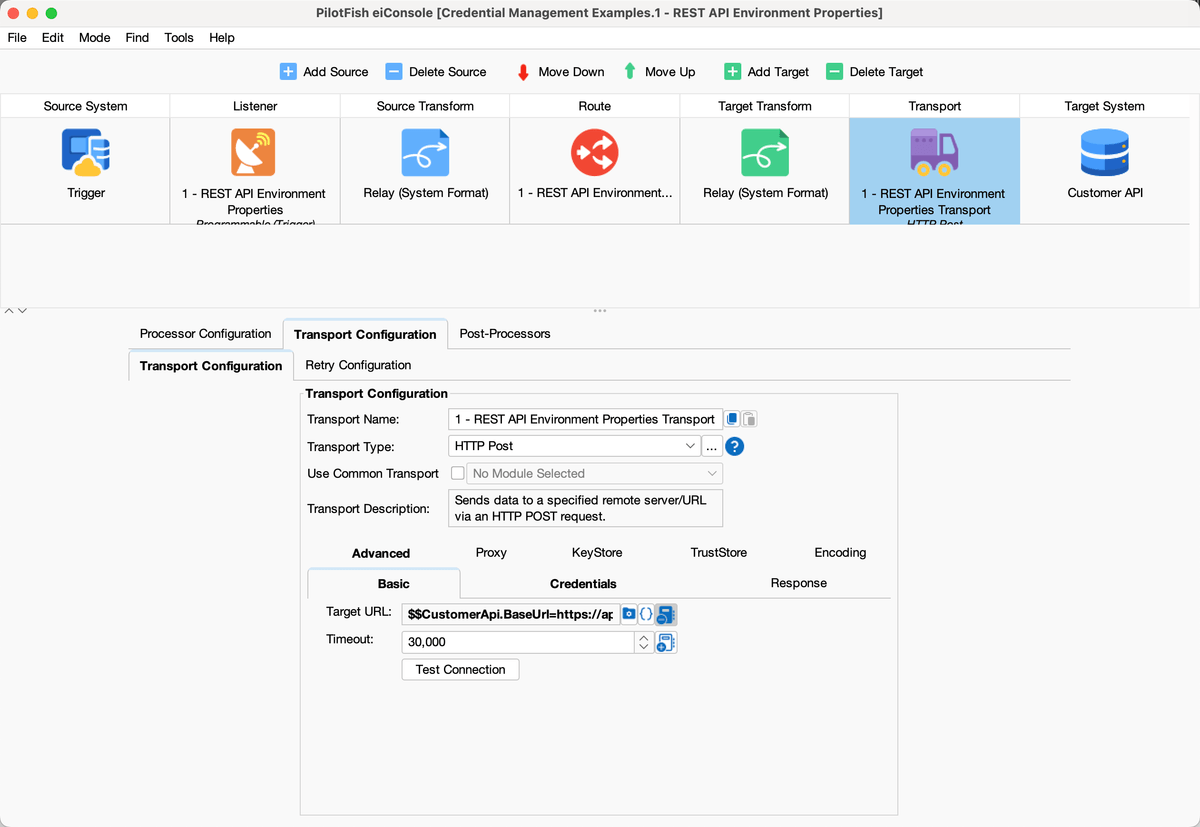
Route 1 in eiConsole: HTTP Post Transport with $$CustomerApi.BaseUrl
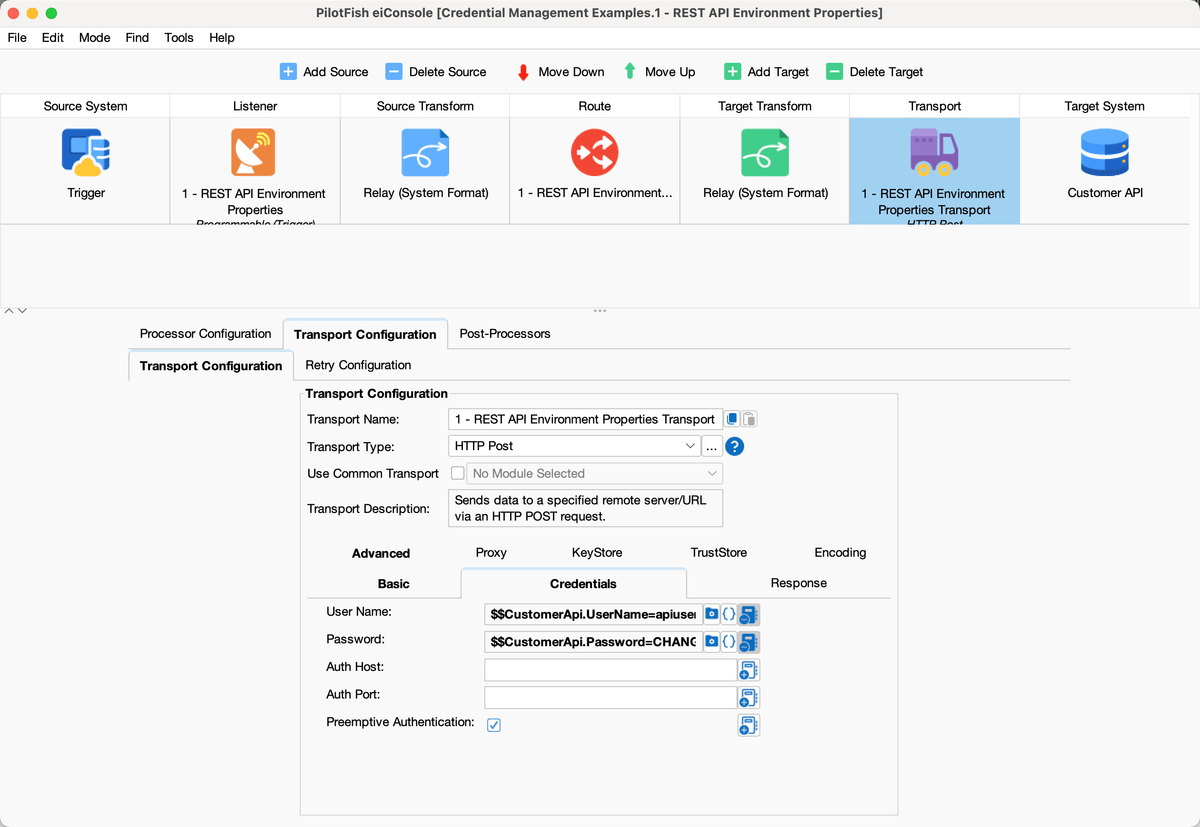
Route 1 Credentials: User Name $$CustomerApi.UserName and Password $$CustomerApi.Password
Configuration used by this Route
CustomerApi.UserName=apiuser

CustomerApi.Password=CHANGE_ME

CustomerApi.BaseUrl=https://api.example.com/v1/resource

HTTP Post Transport

TargetURL = $$CustomerApi.BaseUrl

UserName = $$CustomerApi.UserName

Password = $$CustomerApi.Password
Sample Route 2: REST API OS Environment Variables
Credential flavor: OS environment variables via #system.getenv, still referenced from the Route with $$.
Route 2 is the same REST post as Route 1. Open both Routes side by side: the HTTP module is the same shape. The difference is which Environment Properties it uses.
Route 1’s properties are literal values in the file. Route 2’s properties are OGNL getenv expressions. When PilotFish evaluates $$OsEnv.CustomerApi.Password, it reads CUSTOMER_API_PASSWORD from the process environment. The password is therefore not stored in environment-settings.conf.
The username and password properties have no fallback. If those OS variables are missing, the Route has no secret to send — which is the point. The base URL does have a default, because a host name is not a secret.
Set CUSTOMER_API_USERNAME and CUSTOMER_API_PASSWORD in the environment before PilotFish starts.
What to open in eiConsole
- Route 2 – REST API OS Environment Variables
- Target transport: HTTP Post, same three fields as Route 1, bound to $$OsEnv.CustomerApi.*
- Environment Properties: OsEnv.CustomerApi.UserName, OsEnv.CustomerApi.Password, OsEnv.CustomerApi.BaseUrl
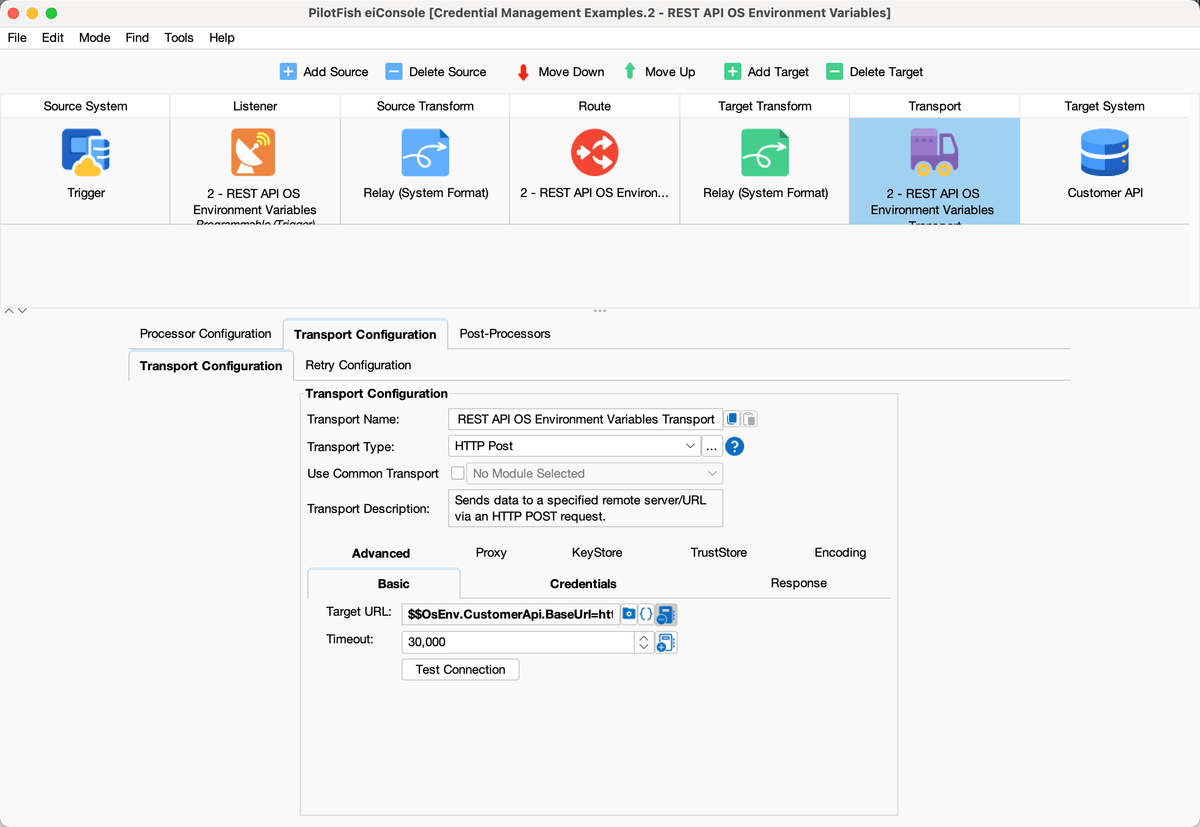
Route 2 in eiConsole: HTTP Post Transport with $$OsEnv.CustomerApi.BaseUrl
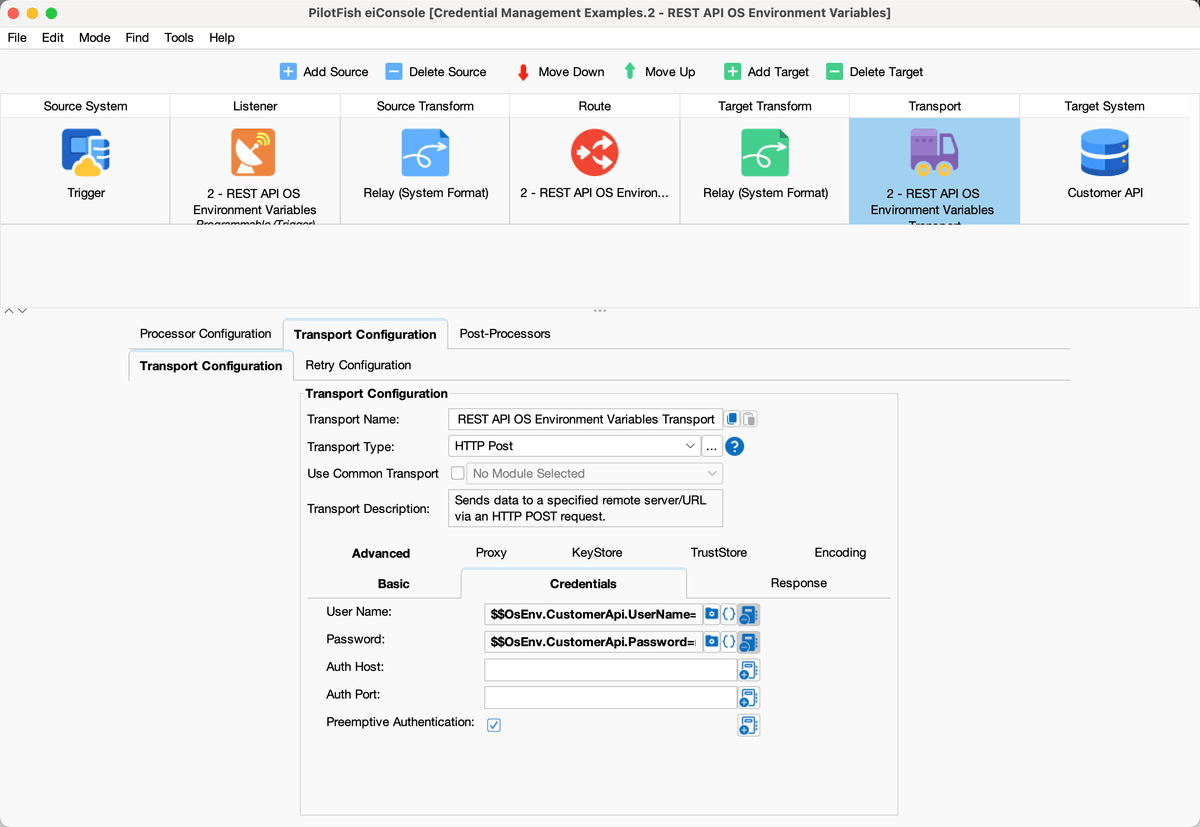
Route 2 Credentials: User Name $$OsEnv.CustomerApi.UserName and Password $$OsEnv.CustomerApi.Password
Configuration used by this Route
OsEnv.CustomerApi.UserName={ognl:#system.getenv('CUSTOMER_API_USERNAME')}

OsEnv.CustomerApi.Password={ognl:#system.getenv('CUSTOMER_API_PASSWORD')}

OsEnv.CustomerApi.BaseUrl={ognl:#system.getenv('CUSTOMER_API_BASE_URL', 'https://api.example.com/v1/resource')}

HTTP Post Transport

TargetURL = $$OsEnv.CustomerApi.BaseUrl

UserName = $$OsEnv.CustomerApi.UserName

Password = $$OsEnv.CustomerApi.Password
Sample Route 3: Directory Poll getenv Default
Credential flavor: getenv with a default value, used only for non-secret settings (directories).
Route 3 watches an inbound folder and copies each file to an outbound folder. It is here to show the getenv default pattern, not to handle a password.
The Listener’s polling directory is $$FileDrop.PollingDirectory. The Transport’s target directory is $$FileDrop.OutputDirectory. Both properties call getenv and supply a default path if the OS variable is unset.
A default is appropriate for directories, host names, and ports. It is not appropriate for passwords, API keys, or client secrets. Routes 2, 4, 5, 6, and 7 do not give password properties a fallback for that reason.
What to open in eiConsole
- Route 3 – Directory Poll getenv Default
- Source: Directory Listener, Polling Directory = $$FileDrop.PollingDirectory
- Target: Directory Transport, Target Directory = $$FileDrop.OutputDirectory, file name copied.txt
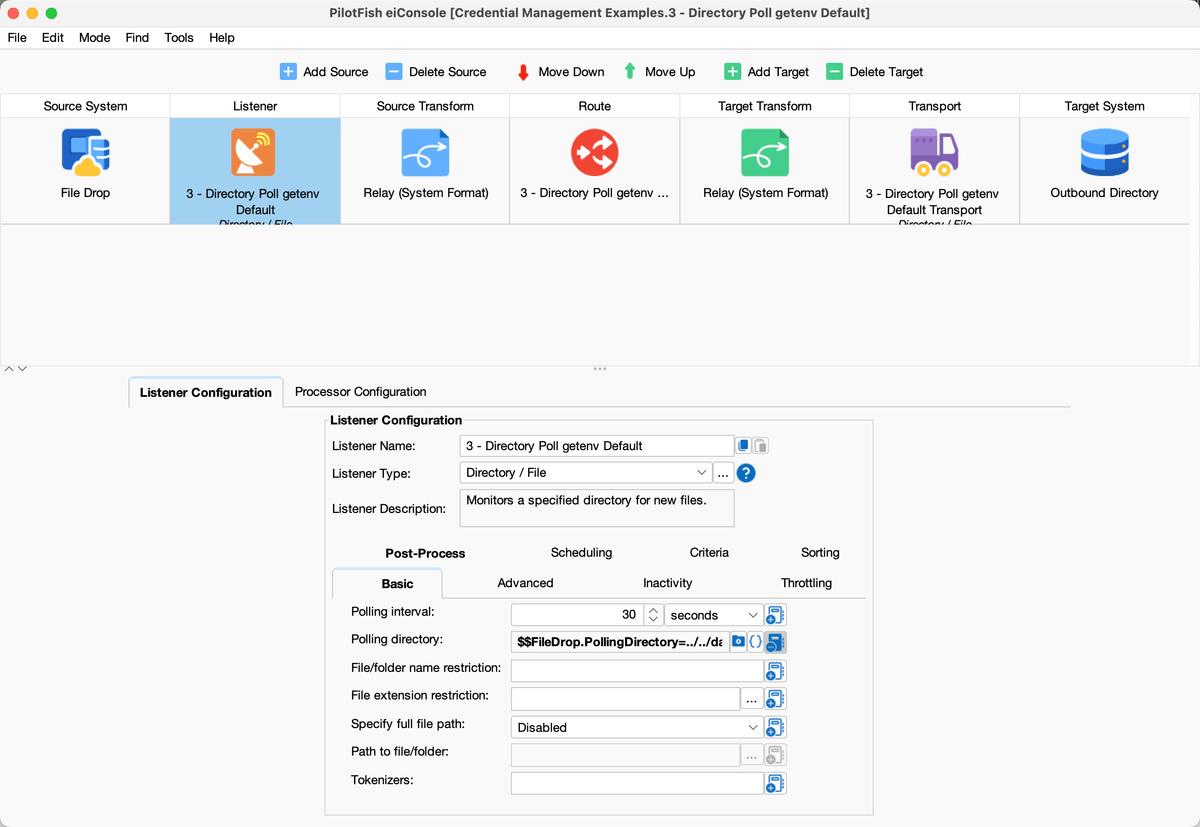
Route 3 Listener: Polling directory = $$FileDrop.PollingDirectory
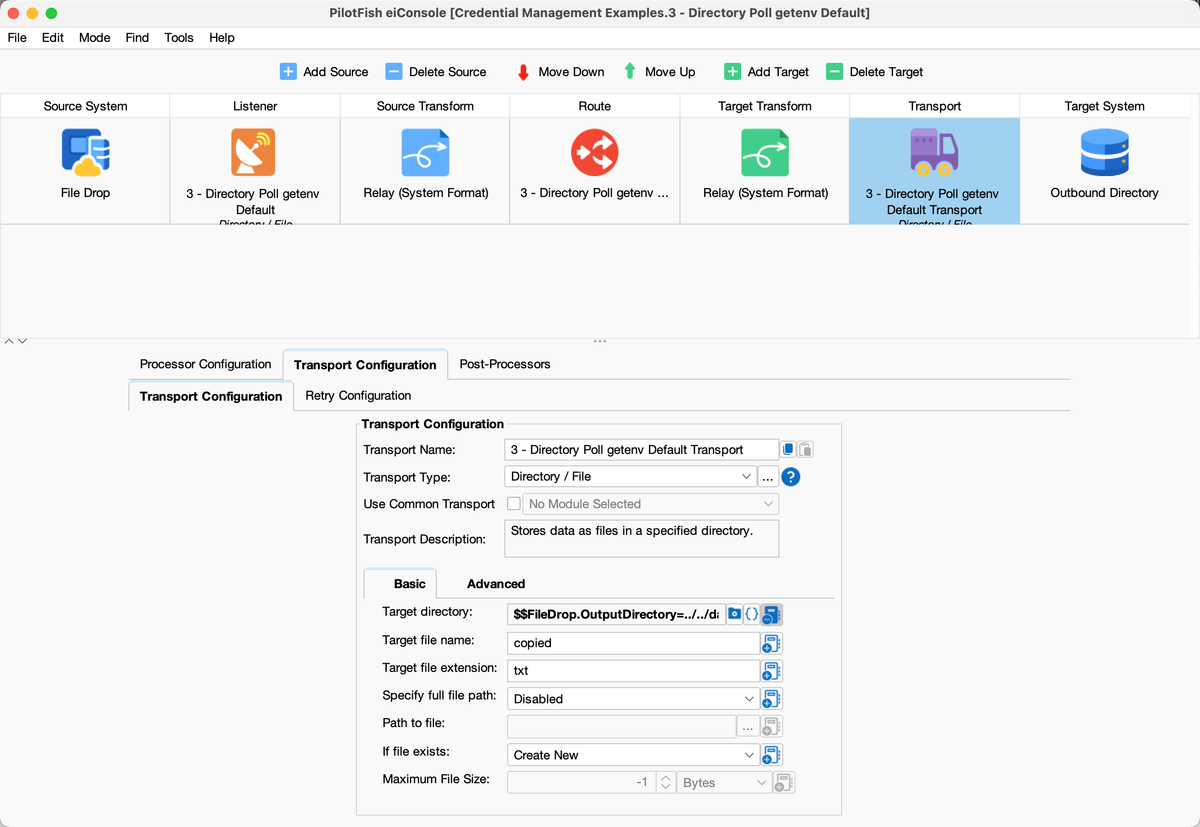
Route 3 Transport: Target directory = $$FileDrop.OutputDirectory
Configuration used by this Route
FileDrop.PollingDirectory={ognl:#system.getenv('FILE_DROP_DIR', '../../data/in')}

FileDrop.OutputDirectory={ognl:#system.getenv('FILE_OUT_DIR', '../../data/out')}
Sample Route 4: Database Credentials
Credential flavor: Same $$ plus getenv pattern as Route 2, applied to JDBC.
Route 4 runs on a timer (once an hour if enabled). It executes SELECT 1 AS connectivity_check against a database, then writes the SQLXML result to ../../data/out/db-check.xml.
The Database SQL Processor does not hard-code a username, password, JDBC URL, or driver. Those four fields are Environment Properties. Username and password come from OS variables with no fallback. The JDBC URL may default to a local example database because a connection string host is often treated like a non-secret setting; the password is never defaulted.
SQL logging is turned off on this Processor so credentials are not written to PilotFish logs.
This is the Route to point at when the customer’s question is “how do we keep Oracle / SQL Server / IRIS passwords out of the Route.”
What to open in eiConsole
- Route 4 – Database Credentials
- Source processor: Database SQL, query SELECT 1 AS connectivity_check
- User Name, Password, JDBC Driver, JDBC URL on that processor
- Target: Directory Transport writing db-check.xml under ../../data/out
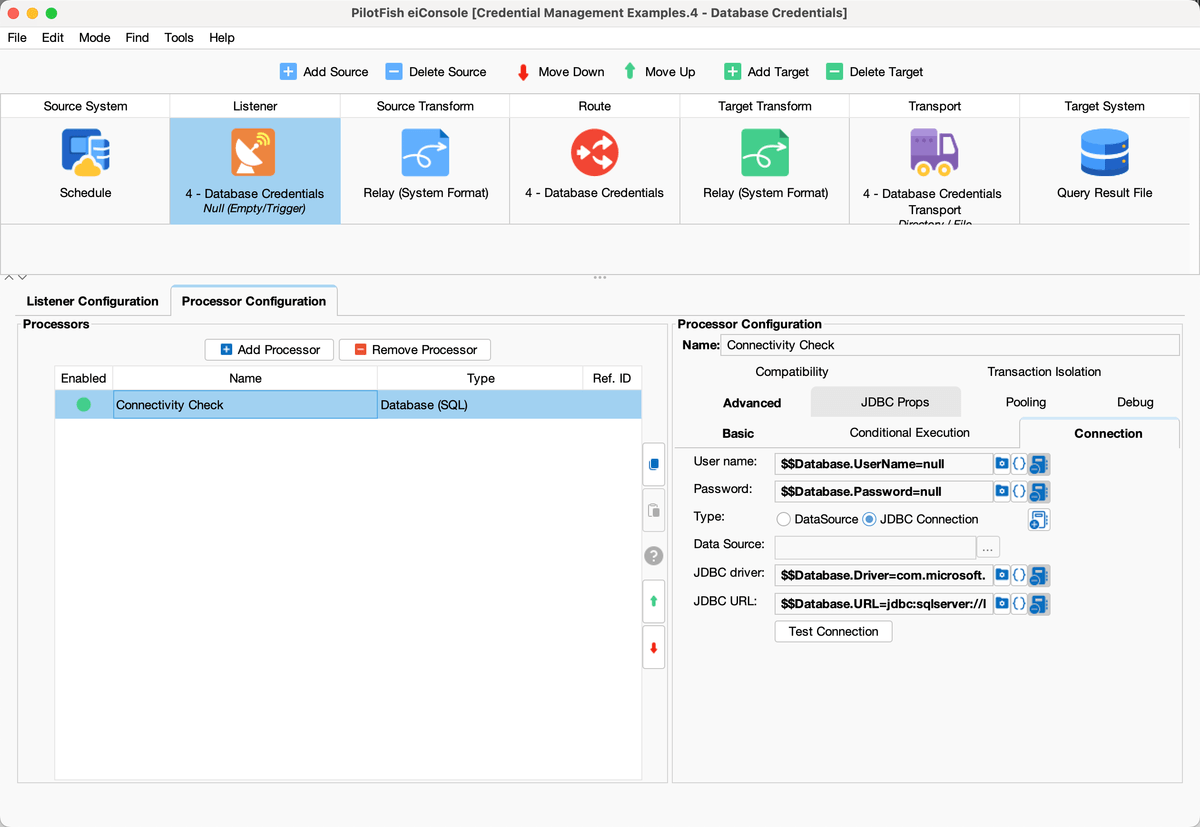
Route 4 Database SQL processor: $$Database.UserName, $$Database.Password, $$Database.URL
Configuration used by this Route
Database.UserName={ognl:#system.getenv('PILOTFISH_DB_USERNAME')}
Database.Password={ognl:#system.getenv('PILOTFISH_DB_PASSWORD')}
Database.URL={ognl:#system.getenv('PILOTFISH_DB_URL', 'jdbc:sqlserver://localhost:1433;databaseName=Example;encrypt=false;trustServerCertificate=true')}
Database.Driver=com.microsoft.sqlserver.jdbc.SQLServerDriver

Database SQL Processor
   UserName = $$Database.UserName
   Password = $$Database.Password
   JdbcURL = $$Database.URL
   JdbcDriver = $$Database.Driver
Sample Route 5: SFTP Enterprise Store Bridge
Credential flavor: Enterprise credential store → startup script → OS environment variable → $$ on the Route.
Route 5 watches ../../data/sftp-drop and uploads each file to a remote SFTP server. The Transport type is Encrypted FTP (JSCH SSH/SFTP).
Host, port, username, password, and remote directory are Environment Properties. Username and password are getenv with no fallback. Host, port, and directory have non-secret defaults.
The Route does not call Azure, AWS, or Vault itself. A startup script is supposed to do that, export SFTP_USERNAME and SFTP_PASSWORD, then start PilotFish. The sample wrapper is scripts/load-credentials-from-store.sh. The same script can also export CUSTOMER_API_* and PILOTFISH_DB_* for Routes 2 and 4.
Use this Route when the customer already has a vault and a deployment process, and PilotFish should only see OS environment variables.
Operating-system environment variables can also provide a bridge between PilotFish and an enterprise credential-management system.
For example, an organization might use Azure Key Vault, AWS Secrets Manager, HashiCorp Vault, or another enterprise secrets-management platform.
A startup process could work as follows:
Credential Store
   |
   v
Startup Script / Deployment Process
   |
   v
Operating-System Environment Variable
   |
   v
#system.getenv(...)
   |
   v
PilotFish Environment Property
   |
   v
PilotFish Route
For example, a startup script could retrieve a secret from the credential store and establish CUSTOMER_API_PASSWORD before PilotFish starts.
PilotFish then retrieves it through #system.getenv(‘CUSTOMER_API_PASSWORD’) and exposes it to Routes through an Environment Property.
The details of retrieving the secret are intentionally outside PilotFish because they depend on the customer’s infrastructure and security tooling.
What to open in eiConsole
- Route 5 – SFTP Enterprise Store Bridge
- Source: Directory Listener on ../../data/sftp-drop
- Target: FTP / SFTP Transport, Encrypted FTP (JSCH SSH/SFTP)
- Host, Port, User Name, Password, Target Directory on that transport
- scripts/load-credentials-from-store.sh for the startup pattern
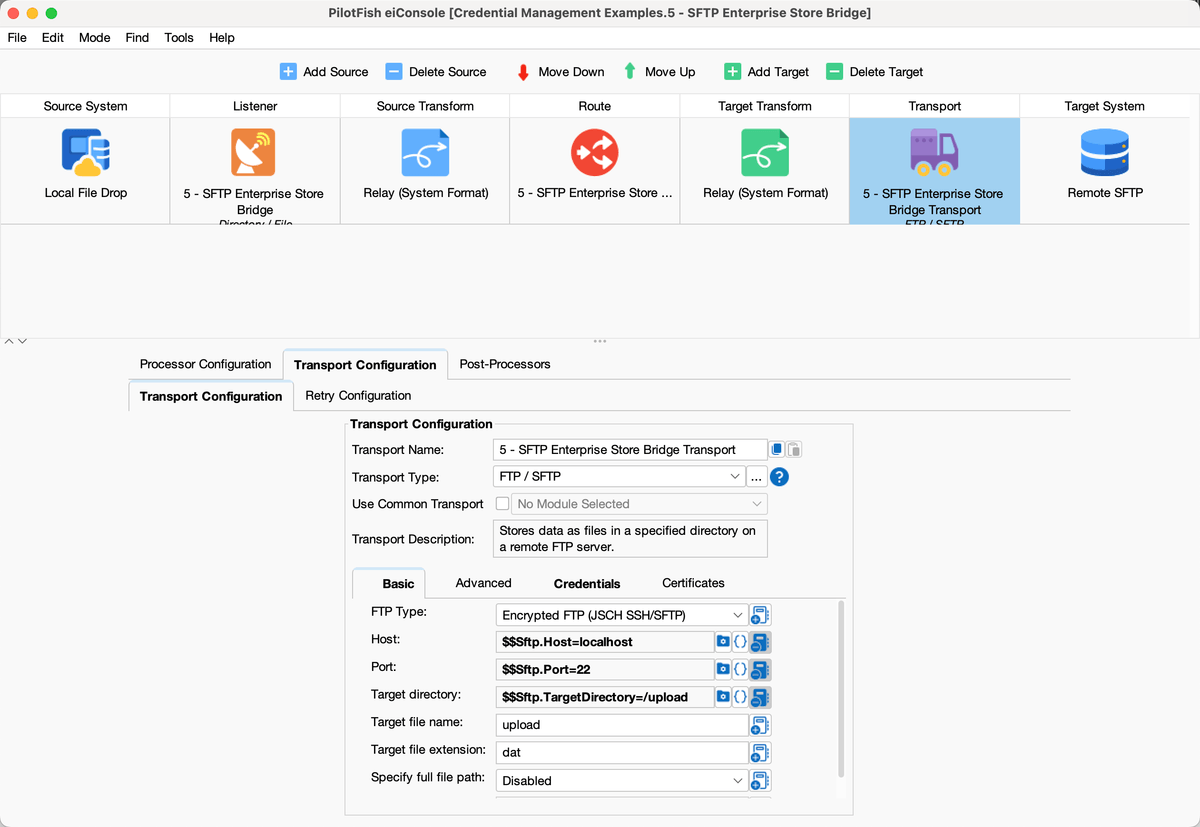
Route 5 SFTP Transport: $$Sftp.Host, $$Sftp.Port, $$Sftp.TargetDirectory
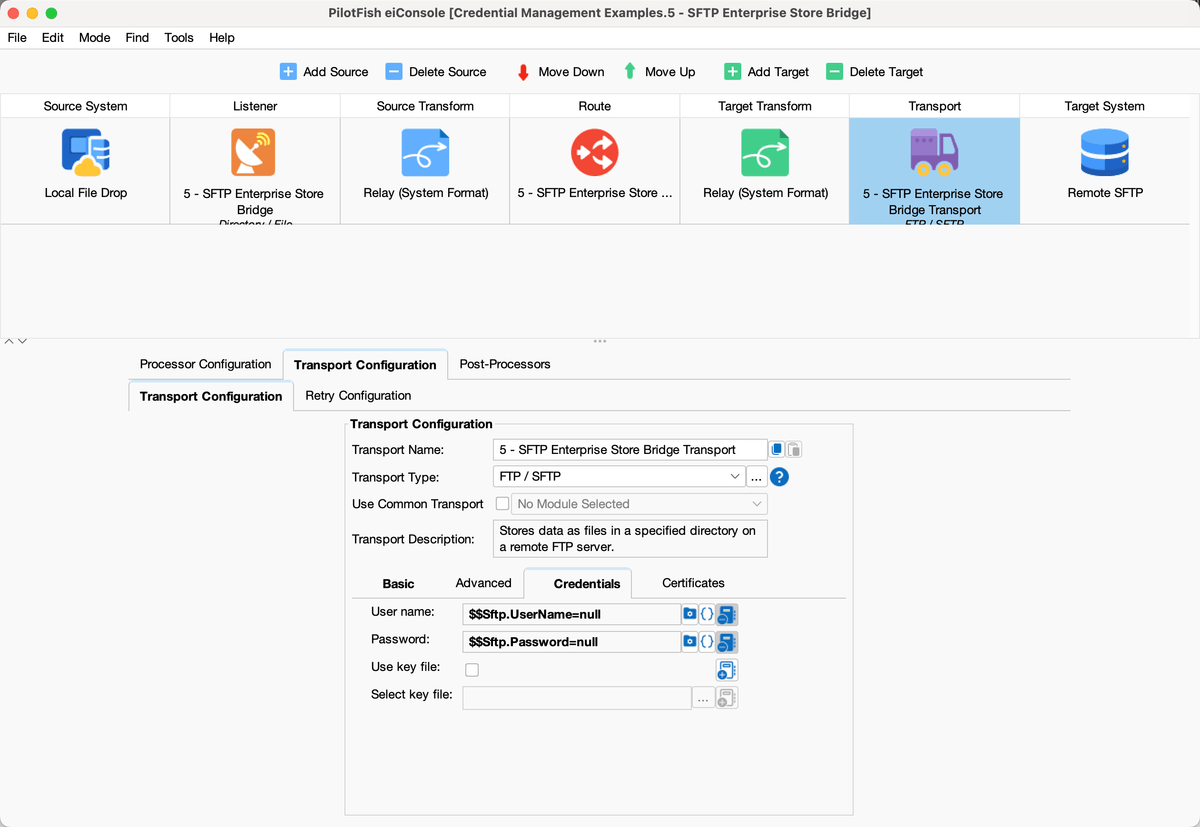
Route 5 Credentials: $$Sftp.UserName and $$Sftp.Password
Configuration used by this Route
Sftp.Host={ognl:#system.getenv('SFTP_HOST', 'localhost')}
Sftp.Port={ognl:#system.getenv('SFTP_PORT', '22')}
Sftp.UserName={ognl:#system.getenv('SFTP_USERNAME')}
Sftp.Password={ognl:#system.getenv('SFTP_PASSWORD')}
Sftp.TargetDirectory={ognl:#system.getenv('SFTP_DIR', '/upload')}

FTP Transport
   Host = $$Sftp.Host
   Port = $$Sftp.Port
   UserName = $$Sftp.UserName
   Password = $$Sftp.Password
   TargetDirectory = $$Sftp.TargetDirectory
Sample Route 6: Credential Store Utility
Credential flavor: Utility Route: authenticate to a credential-store API, retrieve secrets, and hold them in memory.
Route 6 is the retrieve half of the utility-Route pair. If enabled, it runs every five minutes. It authenticates to the credential store, downloads the current secrets, and stores them in memory. It does not call the customer API.
The Target is a RESTful Web Service Transport. It sends HTTP GET to $$CredentialStore.BaseUrl using HTTP Basic Auth. User Name is $$CredentialStore.UserName and Password is $$CredentialStore.Password. Those properties come from OS environment variables, with no fallback. That login is how this Route authenticates to the store. The JSON body of the response is the retrieved secrets. Application passwords never sit in environment-settings.conf in this flavor.
After a successful GET, a JSONPath Evaluator reads $.data.data.API_USERNAME, API_PASSWORD, and API_TOKEN from the JSON body into transaction attributes CustomerApi.UserName, CustomerApi.Password, and CustomerApi.Token. data/credential-store/secrets.json shows the expected response shape.
Three Store Attribute processors then copy those attributes into memory (Attribute → Memory, timeout 0 so they are held until overwritten or the process exits). Other Routes can read them later.
Adjust the JSONPath expressions if the customer’s store returns a different JSON shape (Azure Key Vault uses $.value, for example).
Another option is to retrieve credentials dynamically from within PilotFish.
A dedicated utility Route can call the organization’s credential-management system through an API.
For example:
Credential Store
   |
   | API
   v
PilotFish Credential Utility Route
   |
   v
PilotFish Global Attributes
   |
   v
Application Routes
The utility Route could run on a scheduled basis and retrieve values such as:
API_USERNAME

API_PASSWORD

API_TOKEN
The Route could then store the retrieved values as global attributes that other PilotFish Routes reference.
This approach can be particularly useful when credentials or authentication tokens rotate frequently, expire, must be retrieved dynamically, or are shared by multiple Routes.
Additional design considerations are required for this approach, including authentication to the credential store, error handling, startup behavior, secret expiration, and refresh frequency.
What to open in eiConsole
- Route 6 – Credential Store Utility
- Source: scheduled Listener, polling interval 300 seconds
- Target: RESTful Web Service Transport, method GET to $$CredentialStore.BaseUrl, with User Name and Password set
- User Name = $$CredentialStore.UserName, Password = $$CredentialStore.Password (HTTP Basic Auth on the GET)
- Post-processors: JSONPath Evaluator, then three Store Attribute processors (Attribute → Memory)
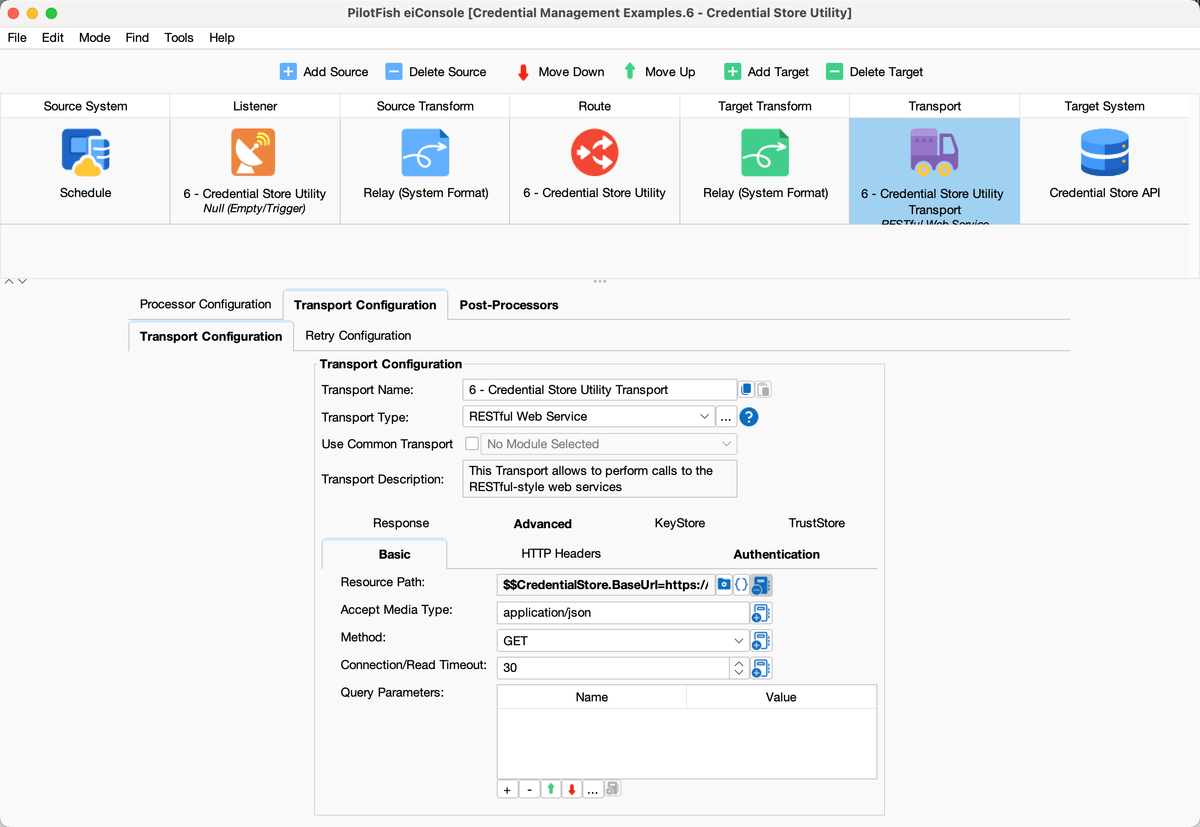
Route 6 REST Transport Basic: GET $$CredentialStore.BaseUrl
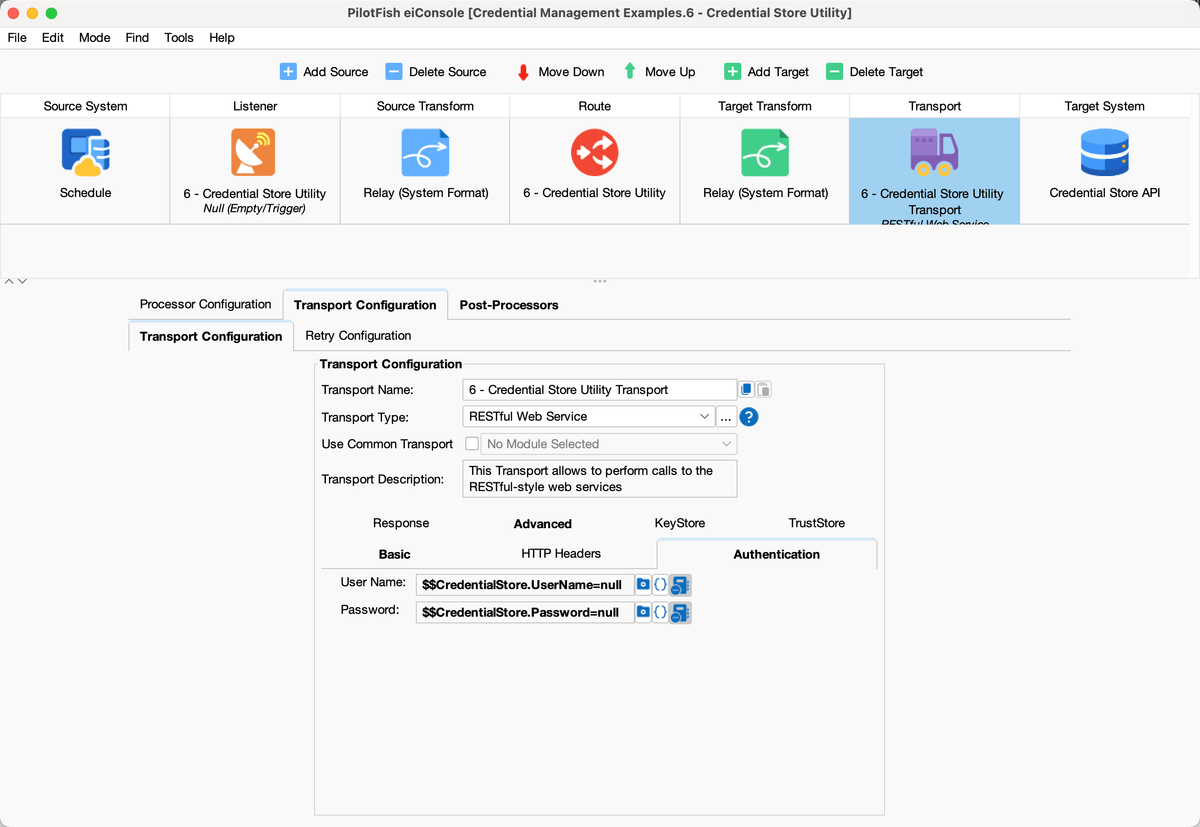
Route 6 REST Transport Authentication: $$CredentialStore.UserName and $$CredentialStore.Password
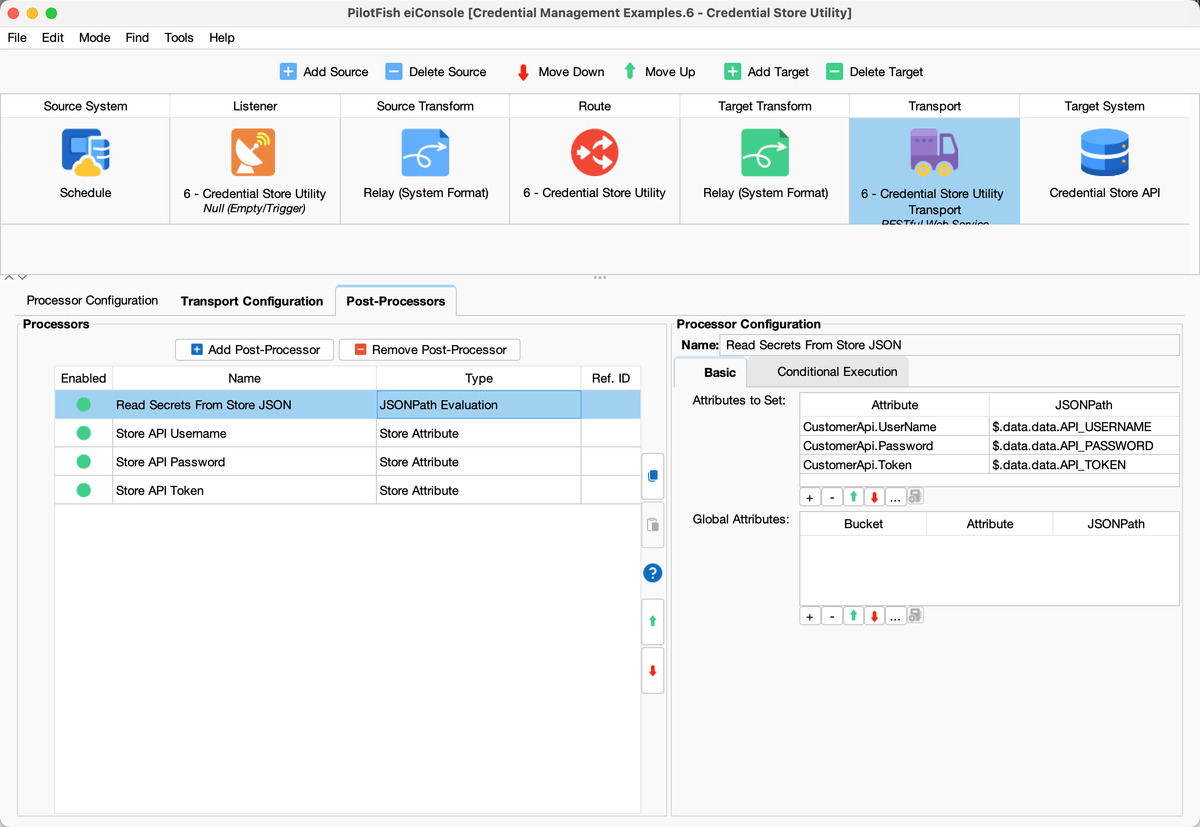
Route 6 Post-Processors: JSONPath Evaluation into CustomerApi.UserName, Password, and Token
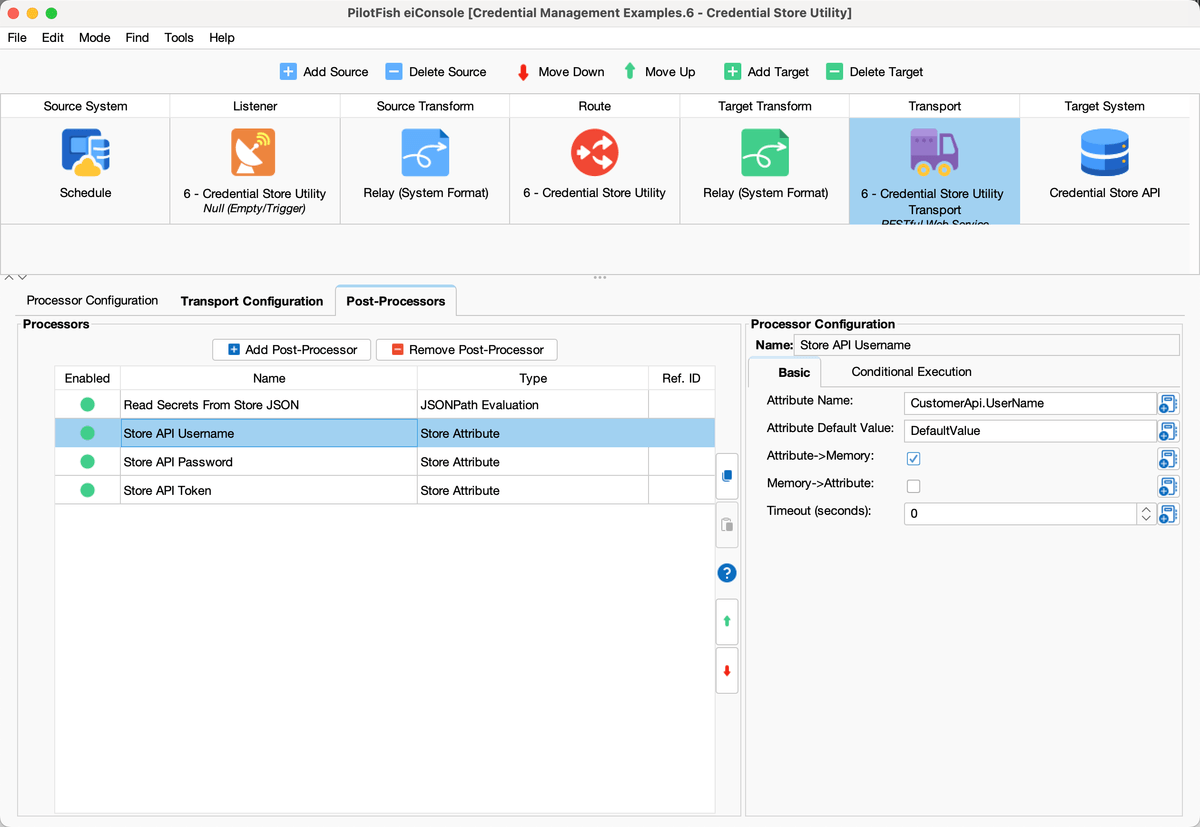
Route 6 Store Attribute: CustomerApi.UserName, Attribute → Memory, timeout 0
Configuration used by this Route
CredentialStore.BaseUrl={ognl:#system.getenv('CREDENTIAL_STORE_URL', 'https://vault.example.com/v1/secret/data/pilotfish')}
CredentialStore.UserName={ognl:#system.getenv('CREDENTIAL_STORE_USERNAME')}
CredentialStore.Password={ognl:#system.getenv('CREDENTIAL_STORE_PASSWORD')}

REST GET $$CredentialStore.BaseUrl
   UserName = $$CredentialStore.UserName
   Password = $$CredentialStore.Password

JSONPath
   $.data.data.API_USERNAME → CustomerApi.UserName
   $.data.data.API_PASSWORD → CustomerApi.Password
   $.data.data.API_TOKEN → CustomerApi.Token

Store Attribute Attribute → Memory TIMEOUT=0

CustomerApi.UserName

CustomerApi.Password

CustomerApi.Token
Sample Route 7: REST API Retrieved Credentials
Credential flavor: Consume secrets that Route 6 stored in memory. This is the application Route in the utility-Route pair.
Route 7 posts to the customer API, the same kind of call as Routes 1 and 2. It is triggerable. Username and password are not $$ Environment Properties. They are read from the in-memory values that Route 6 stored.
The HTTP Post Transport uses those stored values: User Name is {ognl:getAttribute(‘CustomerApi.UserName’)} and Password is {ognl:getAttribute(‘CustomerApi.Password’)}. There is nothing to restore on this Route. The URL still comes from an Environment Property ($$OsEnv.CustomerApi.BaseUrl).
Enable and run Route 6 first. If memory is empty, Route 7 has no password to send.
Use Routes 6 and 7 together when tokens rotate or expire while PilotFish is already running. Use Route 5 instead when secrets only need to be injected once at startup.
What to open in eiConsole
- Route 7 – REST API Retrieved Credentials
- Source: triggerable Listener, no processors — the attributes are already in memory from Route 6
- Target: HTTP Post Transport
- User Name = {ognl:getAttribute(‘CustomerApi.UserName’)}
- Password = {ognl:getAttribute(‘CustomerApi.Password’)}
- Target URL = $$OsEnv.CustomerApi.BaseUrl
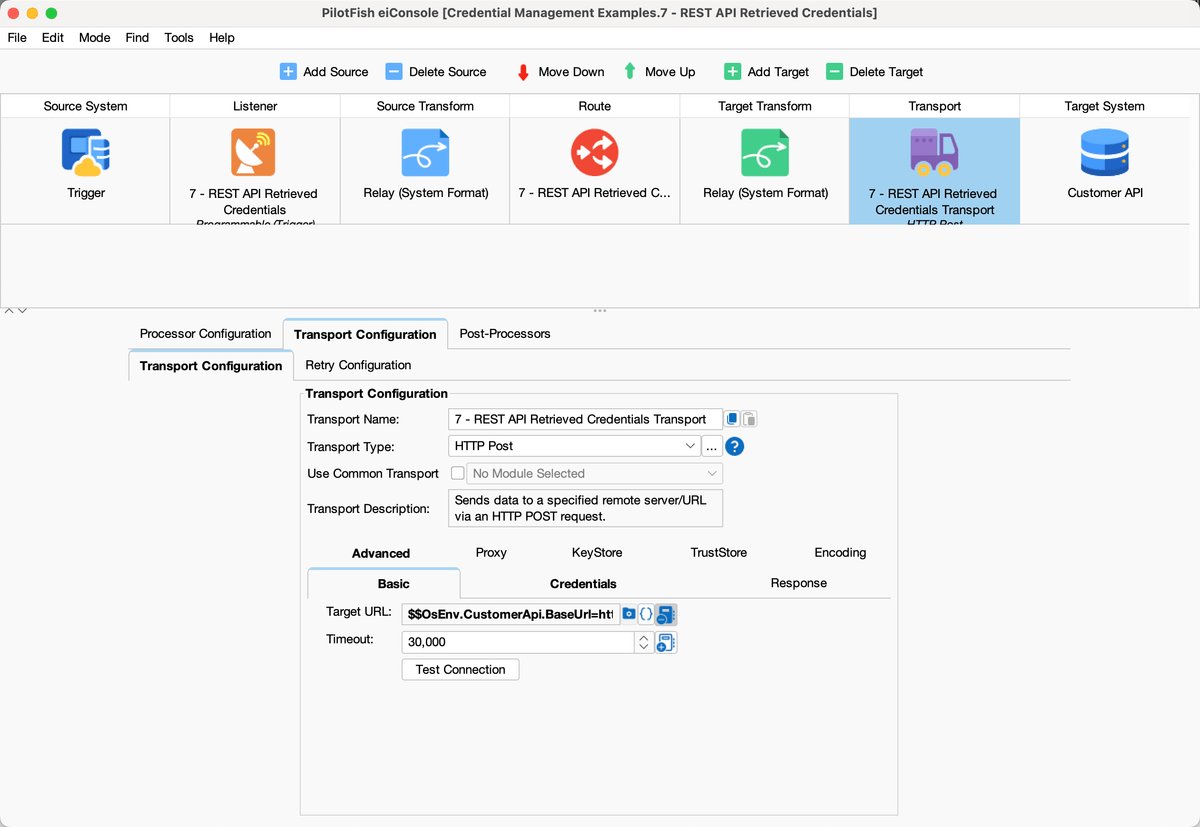
Route 7 HTTP Post Transport: Target URL $$OsEnv.CustomerApi.BaseUrl
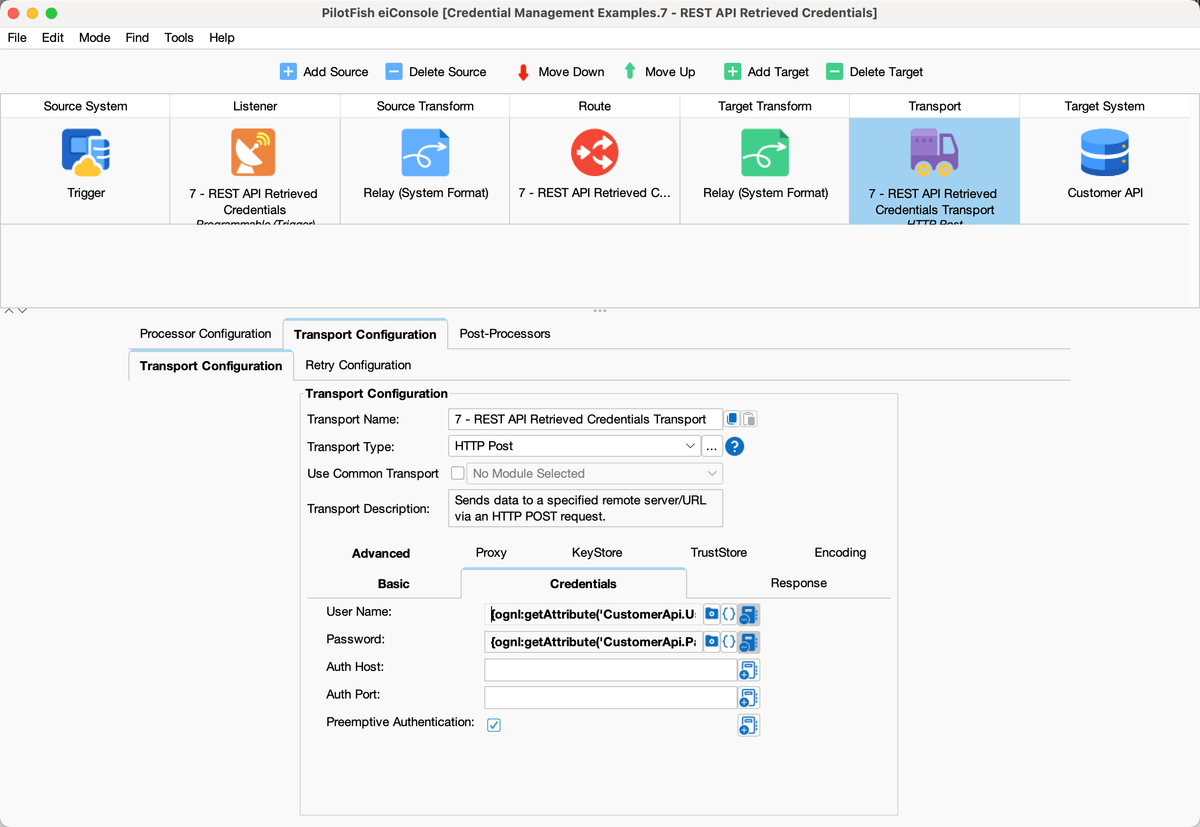
Route 7 Credentials: {ognl:getAttribute(‘CustomerApi.UserName’)} and {ognl:getAttribute(‘CustomerApi.Password’)}
Configuration used by this Route
HTTP Post Transport
   TargetURL = $$OsEnv.CustomerApi.BaseUrl
   UserName = {ognl:getAttribute('CustomerApi.UserName')}
   Password = {ognl:getAttribute('CustomerApi.Password')}
All seven Listeners ship disabled. Enable them only in a controlled environment after replacing example hosts, tokens, and CHANGE_ME placeholders.
Choosing an Approach
There is no single credential-management method that is appropriate for every PilotFish implementation.
The choice depends on factors such as:
- Existing infrastructure
- Security requirements
- Availability of a centralized credential store
- Credential-rotation requirements
- Number of deployment environments
- Deployment procedures
- Application startup procedures
- Operational support requirements
For an initial implementation, environment-settings.conf is often the quickest approach.
Organizations with established enterprise credential-management infrastructure can use OS environment variables or a credential-retrieval utility Route.
| If the customer… | Use this flavor | Sample Route |
|---|---|---|
| Needs Dev/Test/Prod values without editing Routes | environment-settings.conf + $$ | 1 – REST API Environment Properties |
| Must keep secrets out of the property file | getenv into $$ properties | 2 – REST API OS Environment Variables |
| Wants optional overrides for hosts or directories | getenv with a non-secret default | 3 – Directory Poll getenv Default |
| Connects to a database | Same $$ pattern on JDBC fields | 4 – Database Credentials |
| Already has Azure/AWS/Vault and a deploy script | Startup export → getenv → $$ | 5 – SFTP Enterprise Store Bridge |
| Rotates tokens while PilotFish is already running | Utility Route + Store Attribute | 6 and 7 together |
Security Considerations
Regardless of the approach selected:
- Avoid hard-coding passwords, API keys, or secrets directly into Routes.
- Restrict access to files and systems containing credentials.
- Encrypt configuration files where appropriate.
- Avoid writing credentials to PilotFish logs.
- Use separate credentials for Development, Test, and Production when possible.
- Follow credential-rotation policies.
- Grant integration accounts only the permissions required.
- Do not use an actual password or secret as an OGNL fallback value when the goal is to keep the credential outside PilotFish configuration.
- Ensure environment variables are established before the PilotFish process starts when they are required during startup.
In the sample interface, API, database, SFTP, and credential-store password properties have no OGNL fallback. Directory and host defaults are limited to non-secret paths. Transaction logging on the sample Listeners is off so payloads and attributes are not stored in the dashboard log. Route 4 also has SQL logging off.
Summary
PilotFish provides several approaches for externalizing credentials.
The simplest approach is generally to maintain credentials as Environment Properties in environment-settings.conf and reference them from Routes using the $$PropertyName syntax.
For additional separation, an Environment Property can retrieve its value from an operating-system environment variable using:
#system.getenv('VARIABLE_NAME')Organizations with centralized secrets-management infrastructure can populate those operating-system variables from their credential store during application startup.
For environments requiring dynamic credential retrieval or rotation, a PilotFish utility Route can retrieve credentials through an API and make them available to other Routes.
The appropriate approach should be selected based on the organization’s infrastructure, security requirements, and operational preferences.
The Credential Management Examples interface has one sample Route for each of those flavors: Routes 1 through 7, described in the Sample Routes section.